
[CONTENT]
$
USD
Total Economic Impact
Cost Savings And Business Benefits Enabled By Microsoft 365 Copilot Across Multiple Microsoft Teams Products And Licensing Scenarios
A Forrester New Technology Projected Total Economic Impact Study Commissioned by Microsoft, july 2025
Total Economic Impact
A Forrester New Technology Projected Total Economic Impact Study Commissioned by Microsoft, july 2025


Microsoft 365 Copilot enhances the value of Microsoft Teams across several Teams products and licensing scenarios by providing users with AI-powered functionality that improves productivity, enables more frequent collaboration, and encourages more engaging meetings.
“Employees spend anywhere from a third to half of their time at work in meetings, but too many of those meetings are dysfunctional: There are too many of them, they lack purpose, and they don’t produce value for attendees or for the organization.”1 Microsoft 365 Copilot is Microsoft’s AI-powered assistant that aims to improve productivity across Microsoft’s suite of applications. Within Microsoft Teams, Copilot adds functionality, such as conversation summarization; meeting assistance, including catch-up summaries and recaps; information retrieval; writing assistance; and prompt-based interaction that can assist with meeting tasks like brainstorming and agenda creation.
Microsoft commissioned Forrester Consulting to conduct a Total Economic Impact™ (TEI) study and examine the potential return on investment (ROI) enterprises may realize by deploying Microsoft 365 Copilot across their Microsoft Teams products. The purpose of this study is to provide readers with a framework to evaluate the potential financial impact of Microsoft Teams with Copilot on their organizations. While Microsoft 365 Copilot can deliver AI-powered productivity benefits to users across many Microsoft applications, the following report focuses on the value that Microsoft 365 Copilot can deliver to users across multiple Microsoft Teams licensing scenarios, including Microsoft Teams and (Microsoft 365) Copilot; Microsoft Phone and Copilot; Microsoft Rooms and Copilot; and Microsoft Teams Premium (including Places) and Copilot.
To better understand the benefits, costs, and risks associated with this investment, Forrester interviewed seven decision-makers and surveyed 270 respondents who can articulate the current and projected value that Microsoft 365 Copilot will produce across their organization’s Microsoft Teams products. Interviewees’ and survey respondents’ organizations use a combination of licenses for Microsoft Teams (Enterprise and bundled), Microsoft 365 Copilot, Microsoft Teams Phone, Microsoft Teams Rooms, and Microsoft Teams Premium (including Microsoft Places) across their user groups. For the purposes of this study, Forrester aggregated the interviewees’ and survey respondents’ experiences and combined the results into a single composite organization, which is an industry-agnostic organization with 20,000 employees.
Interviewees said that prior to using Microsoft 365 Copilot, their organizations’ users were often subject to an excessive number of meetings and the related preparation and follow-up work. While Microsoft Teams provided users with lots of information aggregated in Teams, finding the right information or context was a struggle, especially as the amount of information available continued to increase. Meeting participation often required manual activities, such as notetaking or agenda creation, as well as downtime related to users coming and going as they moved from meeting to meeting.
After the investment in Microsoft 365 Copilot in Teams, the interviewees said it alleviates challenges around meeting overload for users by providing AI-generated recaps and catch-up summaries before, during, and after meetings, so users can apply more scrutiny when deciding which meetings they need to join. Formerly manual activities around meetings are now automated with Copilot, allowing users to more deeply engage in the conversations, fostering more productive meetings. Users who require a phone can take advantage of the same Copilot benefits on their external calls, driving the same productivity benefits for these users. The interviewees said the benefits of Copilot in Teams are amplified across hybrid or physical meetings with Teams Rooms, allowing hybrid or office-based employees to engage in Teams seamlessly with other remote or hybrid employees with minimal disruptions, further fostering a culture of productive and engaging meetings.
Base: 270 IT decision-makers at firms located globally
Source: A commissioned study conducted by Forrester Consulting on behalf of Microsoft, July 2025
Quantified projected benefits. Three-year, risk-adjusted present value (PV) quantified benefits for the composite organization include:
Saving end users an average of 25 hours per year on meeting preparation, participation, and follow-up activities with Copilot in Teams. Microsoft 365 Copilot gives Teams users AI functionality that allows them to more efficiently prepare for, participate in, summarize, catch up on, and follow up on their meetings. Across the composite organization, users are 15% to 25% more productive in meeting-related activities with Copilot, avoiding up to 50 hours per year on these tasks. This yields a three-year projected PV ranging from $10.4 million (low) to $52.2 million (high).
Reducing the time end users spend in meetings by 38 to 63 hours annually. By leveraging Microsoft 365 Copilot’s meeting summarization catch-up features, users spend less time in meetings that don’t require their direct participation while staying informed on other relevant meetings more frequently than before. The composite organization’s users avoid up to 63 hours in “passive” meetings: This yields a three-year projected PV in productivity savings ranging from $39.2 million (low) to $65.3 million (high).
Avoiding $1.4 million to $1.9 million in legacy telephony costs annually while modernizing with Copilot functionality. The composite organization’s users who still require phone numbers to conduct business are able to take advantage of the same Copilot features and functionality in the Microsoft Teams environment while avoiding legacy telephone and support costs from the previous environment. This yields a three-year projected PV ranging from $3.5 million (low) to $4.7 million (high).
Avoiding up to 260 hours of meeting disruptions annually while supporting a seamless hybrid meeting experience. Copilot in Teams Rooms provides the tools for participants in hybrid or physical meetings to take advantage of Copilot-related efficiencies and avoid technical delays, yielding additional productivity and engagement for meetings. Before using Copilot in Teams Rooms across the composite organization’s meeting rooms, these challenges results in 87 to 260 hours in delays annually. This yields a three-year projected PV ranging from $393,000 (low) to $610,000 (high).
Unquantified benefits. Benefits that provide value for the composite organization but are not quantified for this study include:
Promoting an organizational culture of more productive and engaging meetings. With Microsoft 365 Copilot, the composite organization removes barriers common to meetings, such as catching up, notetaking, recapping, and unproductive brainstorming. As a result, meetings across the organization are often more engaging and productive than before.
Getting more out of hybrid work. Microsoft 365 Copilot and Microsoft Places provide teams with the tools to seamlessly coordinate office days, meeting times, and meeting rooms to ensure the right people are in the right place at the right time.
Improving the employee experience. Microsoft 365 Copilot drives productivity and time savings for users that may serve to mitigate burnout and support a better employee experience.
Costs. Three-year, risk-adjusted PV costs for the composite organization include:
Microsoft license fees of $24.0 million. The composite organization pays for Microsoft Teams Enterprise, Teams Phone, Teams Rooms, Teams Premium, and Microsoft 365 Copilot licenses across four different user licensing scenarios.
Internal adoption and ongoing costs of $157,000. The composite organization uses internal personnel for its three-month Copilot pilot phase. Once Copilot is deployed across the organization’s Teams products, a small internal effort is required to manage user licenses and provide ad hoc support as needed.
Forrester modeled a range of projected low-, medium-, and high-impact outcomes based on evaluated risk. This financial analysis projects that the composite organization accrues the following three-year net present value (NPV) for each scenario by enabling Microsoft Teams with Microsoft 365 Copilot:
Projected high impact of a $98.7 million NPV and projected ROI of 408%.
Projected medium impact of a $58.8 million NPV and projected ROI of 243%.
Projected low impact of a $29.4 million NPV and projected ROI of 122%.
Projected return on investment (PROI)
Projected benefits PV
Projected net present value (PNPV)
Total costs
| Role | Industry | Region | Employees |
|---|---|---|---|
| Senior director | Banking | North America | ~30,000 |
| Director of IT | Banking | US | ~500 |
| IT director | Conglomerate | Europe | ~12,000 |
| Principal IT architect | Construction equipment | Global | ~110,000 |
| Senior manager enterprise collaboration | IT services | North America | ~15,000 |
| Director of IT | Software | North America | ~1,000 |
| Digital center of excellence lead | Utilities | Latin America | ~5,000 |
Interviewees and survey respondents noted how their organizations struggled with common challenges, including:
Helping employees use AI tools to stay ahead of the curve on productivity. Interviewees explained that before their organizations adopted Microsoft 365 Copilot on top of Microsoft Teams, the potential value of AI-based productivity tools was not clear across different roles within the organization. The principal IT architect at a construction equipment organization explained: “We started to pilot Copilot so we can start to understand the value as a whole across the enterprise. As IT folks, we’ve got a pretty good idea of what Copilot can help us with. But I’m not an engineer; I’m not in public relations or finance or communications. We really wanted to start to get a pulse on where Copilot can bring value outside of just the IT organization.”
Meeting fatigue or meeting “FOMO” across the organization. Interviewees explained that users often found their days overtaken by meetings that required little or no direct participation from them, cutting into time that could be used for more productive work. On the other hand, some users frequently overbooked themselves so that they did not miss out on key information from meetings that they otherwise would not typically be required to participate in.
Meeting preparation, participation, and follow-up issues. Meetings at the interviewees’ organizations often required participants to come prepared with context from past meetings to fully engage, leading to recap time at the start of meetings that delayed the start of the main topics. Some users found themselves focusing more on notetaking than actively participating, while post-meeting follow-up tasks were lost in the shuffle. The senior manager enterprise collaboration at an IT services firm summarized this: “If we’re going to have meetings, they’d better be effective meetings where people feel like the time that they’re spending in the meeting is valuable to them.”
Technical and logistical problems related to hybrid meetings. Interviewees noted that facilitating seamless hybrid meetings across users in various geographies was not as simple as ensuring the right tools and technologies were in place. Admins and users alike had difficulty aligning calendars and schedules to bring users together in an optimal manner. For users who could get together, technical challenges related to meeting rooms often hindered efficient meetings. The principal IT architect at a construction equipment organization explained: “Despite my career in real-time communications, when it’s time for a meeting to start and the room doesn’t recognize my machine and the display won’t turn on, it doesn’t matter what my technology background is. People bail on the meeting room and head up to their desks.”
Base: 270 IT decision-makers at firms located globally
Source: A commissioned study conducted by Forrester Consulting on behalf of Microsoft, July 2025
The interviewees’ and survey respondents’ organizations searched for a solution that could:
Deliver additional AI-related value to Microsoft Teams users across various roles and Teams licensing scenarios in the organization.
Enable more efficient and productive meetings.
Improve the feasibility and value of hybrid meetings by facilitating organization and reducing technical issues.
Based on the interviews and survey, Forrester constructed a TEI framework, a composite company, and an ROI analysis that illustrates the areas financially affected. The composite organization is representative of the interviewees’ and survey respondents’ organizations, and it is used to present the aggregate financial analysis in the next section. The composite organization has the following characteristics:
Description of composite. The composite organization is a $10 billion, industry-agnostic organization with 20,000 employees located across the globe. The organization’s employee base primarily consists of hybrid workers who spend at least a few days per week in an office setting. Coordinating meetings across hybrid workers and distributed teams in a way that adds value is a priority for the organization.
Deployment characteristics. After a three-month evaluation period across several different roles and functions in the organization, the composite organization deploys Microsoft 365 Copilot licenses to its users to provide additional AI-driven value from Microsoft 365 Copilot for those users’ Microsoft Teams products across multiple licensing scenarios. The composite has deployed Microsoft Teams Enterprise (along with Microsoft Teams Phone and Microsoft Teams Premium for some users), and Microsoft Teams Rooms across the scenarios below prior to the Microsoft 365 Copilot implementation.
General business users: 14,000 users have Microsoft Teams Enterprise and Microsoft 365 Copilot licenses.
Customer-facing business users, such as sales personnel and call center personnel: 4,000 users have Microsoft Teams Enterprise with the Teams Phone add-on and Microsoft 365 Copilot licenses.
Hybrid business users, such as managerial users and administrators: 2,000 users have Microsoft Teams Enterprise with the Teams Premium add-on and Microsoft 365 Copilot licenses.
$10 billion revenue
20,000 employees
Industry-agnostic
Global operations
40 conference rooms licensed for Microsoft Teams Rooms
| Benefit | Year 1 | Year 2 | Year 3 | Total | Present Value |
|---|---|---|---|---|---|
| Total projected benefits (low) | $21,548,080 | $21,548,080 | $21,548,080 | $64,644,240 | $53,586,886 |
| Total projected benefits (mid) | $33,381,760 | $33,381,760 | $33,381,760 | $100,145,280 | $83,015,496 |
| Total projected benefits (high) | $49,415,440 | $49,415,440 | $49,415,440 | $148,246,320 | $122,888,886 |
Evidence and data. The interviewees and survey respondents noted that Microsoft 365 Copilot enables users to more easily prepare for Teams meetings, engage in these meetings, and determine and act on follow-up tasks resulting from these meetings. They noted that these efficiencies are consistent across hybrid users leveraging Microsoft Teams, Microsoft Teams Phone, and Microsoft Teams Rooms; users with Microsoft Teams Premium licenses take advantage of additional functionality, such as Microsoft Places, to greatly improve efficiency while coordinating meetings.
The senior manager enterprise collaboration at an IT services firm explained that users within their organization not only spend less time on meeting preparation and follow-up but also do the work more efficiently and consistently. They explained: “The turnaround time between finishing a meeting and getting the recap notes has become faster and more consistent. We finish a meeting now and if there’s an action item for me, I know right away, even if I hadn’t taken notes or realized it. I can now add that to my to-do list because I get that information quickly.”
According to the principal IT architect at a construction equipment organization, productivity features within Teams and Copilot transcend the specific role of the user and can provide benefit to nearly anyone in their company. “[Microsoft 365 Copilot] has become an immediate killer app for our users,” they concluded.
With Microsoft 365 Copilot in Microsoft Teams meetings, participants who join late can receive a catch-up recap from Copilot without disrupting the meeting in progress. “Instead of asking for a recap and losing everybody for 5 minutes, we’re using Copilot. So, we’re saving time and staying on track,” summarized the senior director at a North American bank.
The catch-up recaps and post-meeting summaries in Microsoft 365 Copilot were major productivity drivers for users who are often double-booked, according to the director of IT at a software organization. They noted that Copilot allows users to attend parts of overlapping meetings while staying informed on what they missed. They explained: “If I have two overlapping meetings, I’ll attend the first meeting for maybe 30 minutes, and then I will join the other meeting, using Copilot in Teams to ask for a summarization of the first 30 minutes in real time. In the past, you would barge in and disrupt the natural flow of the meeting. Across the company, we find this to be a huge advantage of Microsoft Copilot. [The monthly license fee] could be worth it even for a single meeting.”
The same interviewee also explained the benefit of Teams chat recaps when preparing for other meetings or staying informed on current happenings. They explained: “Say we had a customer issue at 5 a.m. my time. I log in, and there’s a 3-hour conversation between multiple teams on a Teams chat discussion. Before Copilot, I’d spend half an hour scrolling down to read the thread or I’d have to call my team lead and spend 15 minutes on the phone getting up to speed. The team lead catching me up is also going to spend 15 minutes to re-summarize, but I’m also going to get their potentially biased version of what happened. With Copilot, I can ask for a summary and hear what happened, who was involved, and I’ll get right up to speed in a few minutes.”
The senior director at a North American bank explained that during a merger with another bank, the Copilot translation features within Microsoft Teams have been helpful in reducing the language and collaboration barriers that inherently exist between the two organizations, allowing the appropriate personnel to be assigned the right project regardless of language. They noted: “In the past, if we wanted to get our best talent on projects with people who didn’t speak English, they needed to be bilingual. So, we lost productivity, we lost a lot of best practices, and we missed deadlines because we did not have the right people on the job. Using translation in Copilot will help us because we can be fully [present] during meetings where you’re not all necessarily fluent in other languages. Tools like Copilot in Teams ease up the relationship to allow better collaboration.”
The digital center of excellence lead at a utilities organization used Viva Insights to track productivity improvements; it showed significant time savings across the 520 users licensed to Microsoft 365 Copilot. They said: “[Viva Insights] estimates that we’ve saved nearly 16,000 hours in Microsoft Teams-specific tasks so far. We set an organizational goal of achieving 40,000 assisted hours by the end of 2025, which we’re tracking toward closely.” The interviewee broke this number down further, noting that 12,000 hours have been saved summarizing meetings, 3,000 hours on drafting meeting messages and agendas, and 1,000 hours on summarizing Teams chat conversations: “I used to spend an hour drafting meeting notes. With Copilot, I can now complete the task in just 3 minutes.”
Base: 123 IT decision-makers at firms located globally
Source: A commissioned study conducted by Forrester Consulting on behalf of Microsoft, July 2025
| Activities | Average |
|---|---|
| Internal meetings (setup, execution, and follow-up) | 16% |
| External meetings (setup, execution, and follow-up) | 13% |
| Commuting or traveling | 23% |
| User downtime | 19% |
|
Base: 114 IT decision-makers at firms located globally
Source: A commissioned study conducted by Forrester Consulting on behalf of Microsoft, July 2025 |
Modeling and assumptions. For the composite organization, Forrester makes the following assumptions:
Across all roles, the average user has two 30-minute meetings per day.
Forty percent to 60% of these meetings require either preparation work, follow-up work, or both. Preparation and follow-up takes an average of 20 minutes (low) to 40 minutes (high) per meeting to complete.
Based on the customer interviews and survey responses, users can avoid 15% (low) to 25% (high) of this preparation and follow-up work through features and functionality in Microsoft Teams with Microsoft 365 Copilot, including meeting recaps and summaries, Copilot-generated agendas and brainstorming prompts, and post-meeting organization.
The average user saves 10 hours (low) to 50 hours (high) annually.
The average fully burdened hourly rate for an end user is $42.
Forrester assumes a 50% productivity recapture, as not all time reclaimed will necessarily be repurposed to value-adding work.
Results. This yields a three-year projected PV ranging from $10.4 million (low) to $52.2 million (high).
Meeting preparation and follow-up time avoided annually
| Ref. | Metric | Source | Year 1 | Year 2 | Year 3 | |
|---|---|---|---|---|---|---|
| A1 | Total users with Microsoft Teams and Copilot | Composite | 20,000 | 20,000 | 20,000 | |
| A2 | Meetings per week (average) | Assumption | 10 | 10 | 10 | |
| A3 | Meetings per year | A2*50 weeks | 500 | 500 | 500 | |
| A4Low | 40% | 40% | 40% | |||
| A4Mid | Percentage of meetings with preparation and/or follow-up work | Assumption | 50% | 50% | 50% | |
| A4High | 60% | 60% | 60% | |||
| A5Low | 20 | 20 | 20 | |||
| A5Mid | Average time spent on preparation and/or follow-up work (minutes per meeting) | Interviews | 30 | 30 | 30 | |
| A5High | 40 | 40 | 40 | |||
| A6Low | 1,333,333 | 1,333,333 | 1,333,333 | |||
| A6Mid | Time spent on preparation and/or follow-up work (hours per year) | (A1*A3*A4*A5)/ 60 minutes | 2,500,000 | 2,500,000 | 2,500,000 | |
| A6High | 4,000,000 | 4,000,000 | 4,000,000 | |||
| A7Low | 67 | 67 | 67 | |||
| A7Mid | Time spent on preparation and/or follow-up work per user (hours per year) | A6/A1 | 125 | 125 | 125 | |
| A7High | 200 | 200 | 200 | |||
| A8Low | 15% | 15% | 15% | |||
| A8Mid | Avoided preparation and follow-up task time with Copilot | Interviews and survey | 20% | 20% | 20% | |
| A8High | 25% | 25% | 25% | |||
| A9 | Average fully burdened hourly rate for an end user | Composite | $42 | $42 | $42 | |
| A10 | Productivity recapture | TEI methodology | 50% | 50% | 50% | |
| AtLow | $4,200,000 | $4,200,000 | $4,200,000 | |||
| AtMid | Improved pre-meeting, in-meeting, and post-meeting user efficiency | A1*A7*A8*A9*A10 | $10,500,000 | $10,500,000 | $10,500,000 | |
| AtHigh | $21,000,000 | $21,000,000 | $21,000,000 | |||
| Three-year projected total: $12,600,000 - $63,000,000 | Three-year projected present value: $10,444,778 - $52,223,892 | |||||
Evidence and data. The interviewees and survey respondents cited “meeting fatigue” across their organizations as a significant pain point; they brought in Microsoft 365 Copilot to reduce this fatigue across their organizations’ Microsoft Teams meetings. Before the Copilot implementation, users frequently joined meetings where they were not a direct participant in order to stay informed. In many cases, users only needed some of the information from a meeting but were required to attend the entire meeting regardless. Meeting recaps and summaries from Microsoft 365 Copilot across Microsoft Teams products allow users to avoid spending time in meetings that they otherwise did not need to join.
The senior manager enterprise collaboration at an IT services firm explained that Copilot in Teams empowers users to make smart decisions around whether they need to actually join a meeting by ensuring that they receive meeting recap notes and relevant information after a meeting. In most cases, users who are not presenting or participating in these meetings are sufficiently served by the AI recap, saving significant amounts of time from meetings that would otherwise involve passive participation. “We’re getting our users in two places at the same time now [with Copilot],” the interviewee concluded, stating that users across the organization report spending 13 to 15 fewer hours in meetings per month on average — while the meetings they are attending are more engaging and productive.
The principal IT architect at construction equipment organization noted that by having AI meeting recap notes and automatically generated follow-up tasks directly in Microsoft Teams, users are more likely to act on meeting follow-up activities than before, improving the outcomes and value of the meeting. They said, “People are taking post-meeting actions that they never would have taken before without having action items directly in Teams, which makes the whole meeting more effective.”
The senior director at a North American bank explained that Copilot within Teams is also effective at serving their users who are frequently double- or triple-booked, improving “offline” meeting participation while reducing anxiety about missing out on key information or discussion topics. “As someone who’s usually triple-booked, Copilot gets me the summary [without] attending the meeting, so I can react or follow up as needed. I can ask Copilot, ‘What are the next steps? What are the key issues?’ Copilot gives me the information that I need without attending.” Copilot users within the organization reported average savings of 1.5 to 2 hours per week from avoided Teams meetings alone.
Modeling and assumptions. For the composite organization, Forrester makes the following assumptions:
The average user (across all roles) joins two 30-minute Teams meetings per day — or 500 meetings per year.
Based on the interviews and survey responses, users can avoid 15% (low) to 25% (high) of these meetings thanks to AI recaps and Microsoft 365 Copilot functionality in Microsoft Teams.
The average user saves 38 hours (low) to 63 hours (high) per year in “avoidable” meetings.
The average fully burdened hourly rate for an end user is $42.
Forrester assumes a 50% productivity recapture, as not all time reclaimed will necessarily be repurposed to value-adding work.
Results. This yields a three-year projected PV ranging from $39.2 million (low) to $65.3 million (high).
Time saved per user from avoided Microsoft Teams meetings with Microsoft 365 Copilot functionality
| Ref. | Metric | Source | Year 1 | Year 2 | Year 3 | |
|---|---|---|---|---|---|---|
| B1 | Total users with Teams and Copilot | A1 | 20,000 | 20,000 | 20,000 | |
| B2 | Meetings per year | A3 | 500 | 500 | 500 | |
| B3 | Average meeting duration (minutes) | Composite | 30 | 30 | 30 | |
| B4Low | 15% | 15% | 15% | |||
| B4Mid | Percentage of meetings that do not require direct participation and are avoidable with Copilot recaps | Interviews | 20% | 20% | 20% | |
| B4High | 25% | 25% | 25% | |||
| B5Low | 38 | 38 | 38 | |||
| B5Mid | Saved hours spent from meetings that do not require direct participation and are avoidable with Copilot recaps (per user) | (B2*B3*B4)/60 minutes | 50 | 50 | 50 | |
| B5High | 63 | 63 | 63 | |||
| B6 | Average fully burdened hourly rate for an end user | A9 | $42 | $42 | $42 | |
| B7 | Productivity recapture | TEI methodology | 50% | 50% | 50% | |
| BtLow | $15,750,000 | $15,750,000 | $15,750,000 | |||
| BtMid | User productivity improvement from efficient meeting participation | B1*B5*B6*B7 | $21,000,000 | $21,000,000 | $21,000,000 | |
| BtHigh | $26,250,000 | $26,250,000 | $26,250,000 | |||
| Three-year projected total: $47,250,000 - $78,750,000 | Three-year projected present value: $39,167,919 - $65,279,865 | |||||
Evidence and data. According to the interviewees and survey respondents, Microsoft 365 Copilot delivered the same level of productivity benefits to users who need a phone for customer/external communication or collaboration while offsetting existing telephony costs by consolidating into the Microsoft Teams environment.
The senior director at a North American bank explained that the Microsoft 365 Copilot features within Teams Phone greatly benefit the productivity of users who are required to adhere to client documentation requirements. They explained: “When our advisors talk to clients on the phone, they have to document what they talked about and what decisions have been made in terms of investments, for instance. For these folks that have Copilot [within Teams Phone], why not utilize it and have Copilot do the summary of the client meeting to put in the file?” For advisors handling the typical number of clients, the interviewee quantified 90 hour of savings per advisor per year on client documentation through Copilot in Teams Phone.
Survey respondents estimated that Microsoft 365 Copilot features in Teams Phone allow users to be 26% more productive on call-related activities.
Survey respondents noted several role-specific efficiencies for users with a Copilot in Teams Phone license: On average, they noted a 21% increase in call volume, a 27% reduction in average call time, and an improvement in resolution time of 25% attributable to Copilot productivity functionality in Teams Phone.
Base: 110 IT decision-makers at firms located globally
Source: A commissioned study conducted by Forrester Consulting on behalf of Microsoft, July 2025
The survey respondents’ organizations that use Microsoft Teams Phone have avoided an average of $1.0 million per year in telephony costs since adopting Microsoft Teams Phone.
The principal IT architect at a construction equipment organization explained that when moving telephony into Microsoft Teams with Teams Phone, they were able to rightsize the number of licenses they actually needed given the calling requirements of the specific user. In this case, their organization was able to save tens of thousands of dollars on licenses and physical phone system upkeep; Microsoft holds the phone numbers for the organization in case they are needed later.
Base: 109 IT decision-makers at firms located globally
Source: A commissioned study conducted by Forrester Consulting on behalf of Microsoft, July 2025
Modeling and assumptions. For the composite organization, Forrester makes the following assumptions:
4,000 end users across roles that require external communication avoid between $30 (low) and $40 (low) on monthly voice and usage telephony costs.
Results. This yields a three-year projected PV ranging from $3.6 million (low) to $4.8 million (high).
| Ref. | Metric | Source | Year 1 | Year 2 | Year 3 | |
|---|---|---|---|---|---|---|
| C1 | Microsoft Teams Phone users | Composite | 4,000 | 4,000 | 4,000 | |
| C2Low | $30 | $30 | $30 | |||
| C2Mid | Average monthly voice and usage costs per user | Interviews | $35 | $35 | $35 | |
| C2High | $40 | $40 | $40 | |||
| CtLow | $1,440,000 | $1,440,000 | $1,440,000 | |||
| CtMid | Avoided telephony costs with Microsoft Teams Phone | C1*C2*12 | $1,680,000 | $1,680,000 | $1,680,000 | |
| CtHigh | $1,920,000 | $1,920,000 | $1,920,000 | |||
| Three-year projected total: $4,320,000 - $5,760,000 | Three-year projected present value: $3,581,067 - $4,774,756 | |||||
Evidence and data. As organizations increasingly adopt hybrid work across their employee populations, interviewees and survey respondents noted that enabling efficient and valuable hybrid meetings with both in-person and remote participants is a continued priority. They said that before implementing Microsoft Teams and Microsoft 365 Copilot, hybrid meetings were often plagued by logistical challenges (getting the right participants to the right meeting at the right time in the right place) and technical challenges (ensuring the room’s technology worked without interruption); the effort involved called the value of hybrid meetings into question. Microsoft Teams Rooms with Microsoft 365 Copilot allowed the hybrid meeting participants at the interviewees’ and respondents’ organizations to take advantage of the Copilot-related benefits for users detailed in benefits A and B in this report while ensuring seamless meetings both logistically and technically. This further improved the efficiency of meetings while reducing the burden on IT resources to resolve technical issues as they arose.
The senior manager enterprise collaboration at an IT services firm noted that maximizing the impact of hybrid meetings is an increased focus for their organization and that Microsoft Teams Rooms and Microsoft Teams Premium (Places) with Copilot allows them to maximize their impact. They explained: “We are very much a hybrid shop. But people are having a hard time knowing when people are in the office. If they’re going into the office, we want to make sure that the time spent there is fruitful. We’re very passionate about making moments together that matter, which is why [Microsoft Teams Premium] Places works so well for us. We want to make sure that we are making moments that matter with our co-workers.” The interviewee noted that previous efforts to coordinate hybrid meetings used custom schedules or calendars that required manual effort to manage.
The principal IT architect at a construction equipment organization noted that Microsoft Teams Rooms and Copilot together bring tremendous value to users, even given the upfront and ongoing licensing costs: “The costs are greatly offset by the reduced amount of downtime and general frustration that folks experience when they go into meeting rooms. We have confidence that it’s going to work. We don’t have to show up early. We don’t have to schedule the same room every time because we know it works. There are all of these indirect benefits as well.”
The senior director at a North American bank described their Teams Rooms with Copilot experience as “flawless,” as the technology allows remote participants to interact with in-person participants as if they were actually in the same room.
The IT director at a conglomerate stated that by moving conference rooms to Teams Rooms, in-person meetings are no longer at risk of delay due to technical or connectivity issues, while corporate IT personnel no longer spend time supporting such issues.
Seventy-five percent of the survey respondents whose organizations are using Teams Rooms cited the accuracy of in-room speaker recognition and the related Copilot features, such as intelligent recap, as major drivers of value for hybrid meetings. Respondents estimated that hybrid Teams Rooms meetings are over 30% more productive with Microsoft 365 Copilot.
Modeling and assumptions. For the composite organization, Forrester makes the following assumptions:
On average, each conference/meeting room hosts 10 meetings per week.
Before outfitting and licensing the composite organization’s 40 meeting rooms with Microsoft Teams Rooms, 5% (low) to 15% (high) of meetings experience a technical delay that results in a 5-minute delay to the meeting. Across the organization’s meeting rooms, this results in 87 hours (low) to 260 hours (high) of delays per year.
Each meeting includes an average of 12 hybrid participants.
The average fully burdened hourly rate for a meeting participant is $42.
One IT resource avoids 1 hour of troubleshooting, support, or maintenance per room per week, on average, after adopting Microsoft Teams Rooms.
The average fully burdened hourly rate for an IT resource is $55.
Results. This yields a three-year projected PV ranging from $393,000 (low) to $610,000 (high).
| Ref. | Metric | Source | Year 1 | Year 2 | Year 3 | |
|---|---|---|---|---|---|---|
| D1 | Teams Rooms meeting rooms | Composite | 40 | 40 | 40 | |
| D2 | Meetings per room per week (average) | Composite | 10 | 10 | 10 | |
| D3Low | 5% | 5% | 5% | |||
| D3Mid | Percentage of meetings with technical delays before Teams Rooms | Interviews and survey | 10% | 10% | 10% | |
| D3High | 15% | 15% | 15% | |||
| D4Low | 1,040 | 1,040 | 1,040 | |||
| D4Mid | Disrupted meetings (per year) | D1*D2*D3* 52 weeks | 2,080 | 2,080 | 2,080 | |
| D4High | 3,120 | 3,120 | 3,120 | |||
| D5 | Average delay per meeting (minutes) | Interviews and survey | 5 | 5 | 5 | |
| D6Low | 87 | 87 | 87 | |||
| D6Mid | Avoided annual meeting disruptions (hours, rounded) | D4*D5/60 minutes | 173 | 173 | 173 | |
| D6High | 260 | 260 | 260 | |||
| D7 | IT personnel hours avoided per room per week (hours) | Interviews and survey | 1 | 1 | 1 | |
| D8 | Average fully burdened hourly rate for IT personnel | Composite | $55 | $55 | $55 | |
| D9 | Affected meeting participants (average) | Interviews and survey | 12 | 12 | 12 | |
| D10 | Average fully burdened hourly rate for a meeting participant | A9 | $42 | $42 | $42 | |
| DtLow | $158,080 | $158,080 | $158,080 | |||
| DtMid | Reduction in hybrid meeting disruptions | (D6*D9*D10) + (D1*D7*D8*52) | $201,760 | $201,760 | $201,760 | |
| DtHigh | $245,440 | $245,440 | $245,440 | |||
| Three-year projected total: $474,240 – $736,320 | Three-year projected present value: $393,122 – $610,373 | |||||
Interviewees and survey respondents mentioned the following additional benefits that their organizations experienced but were not able to quantify:
Promoting an organizational culture of more productive and engaging meetings. Interviewees told Forrester that Microsoft 365 Copilot features within Microsoft Teams not only allow users to save time as quantified in this report but also enable them to remain informed on meetings that they would otherwise not attend. Interviewees explained that meetings across the organization are often more engaging and productive than before as a result of removing barriers common to meetings, such as catching up after it starts, notetaking, recapping, and unproductive brainstorming. The senior manager enterprise collaboration at an IT services firm summarized this: “We’re more present and we feel like we’re contributing more in meetings. We don’t have to worry about going back and clarifying things we missed since we can just ask Copilot at the end of the meeting. As a result, we can be more present [in meetings] since we’ll have access to all the information after the fact.”
Getting more out of hybrid work. Interviewees noted that beyond the productivity benefits quantified for this report, Microsoft 365 Copilot and Microsoft Teams Premium (Microsoft Places) provide teams with the tools to seamlessly coordinate office days, meeting times, and meeting rooms to ensure the right people are in the right place at the right time.
Improving the employee experience. Interviewees explained that while the time savings for their employees through Microsoft 365 Copilot in Teams will have a significant impact on the business from a productivity standpoint, time savings are also valuable in combating employee burnout and supporting a better employee experience.
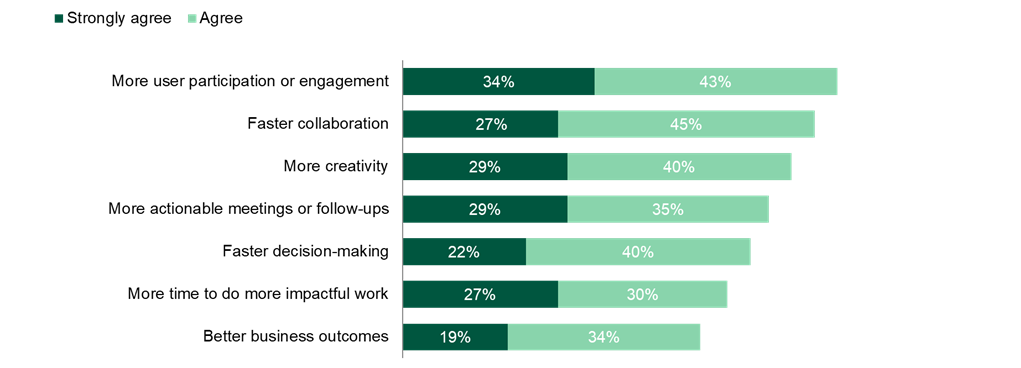
Base: 124 IT decision-makers at firms located globally
Source: A commissioned study conducted by Forrester Consulting on behalf of Microsoft, July 2025
The value of flexibility is unique to each customer. There are multiple scenarios in which a customer might implement Microsoft Teams and Microsoft 365 Copilot and later realize additional uses and business opportunities, including:
The downstream benefits of getting users “ahead of the curve” on AI productivity tools. Interviewees were optimistic that onboarding users to Microsoft 365 Copilot would allow their users to develop the skills required to adapt to new ways of working, providing additional productivity over time.
The benefits of Microsoft 365 Copilot beyond Microsoft Teams. While beyond the scope of this report (Microsoft 365 Copilot benefits across Microsoft Teams licensing scenarios), interviewees explained to Forrester that the benefits of Copilot go far beyond Teams in an organization’s Microsoft environment, providing additional value for each Copilot license. The senior manager enterprise collaboration at an IT services organization explained that Copilot utilization is always over 90% across several Microsoft products (including Microsoft Teams).
Flexibility would also be quantified when evaluated as part of a specific project (described in more detail in Total Economic Impact Approach).
| Ref. | Cost | Initial | Year 1 | Year 2 | Year 3 | Total | Present Value |
|---|---|---|---|---|---|---|---|
| Etr | Microsoft licensing costs | $0 | $9,659,160 | $9,659,160 | $9,659,160 | $28,977,480 | $24,020,901 |
| Ftr | Internal adoption and ongoing costs | $94,500 | $25,200 | $25,200 | $25,200 | $170,100 | $157,169 |
| Total costs (risk-adjusted) | $94,500 | $9,684,360 | $9,684,360 | $9,684,360 | $29,147,580 | $24,178,070 |
Evidence and data. All of the interviewees detailed different licensing scenarios for their organization’s users based on their specific needs. Interviewees also noted that Microsoft Teams and Microsoft 365 Copilot licensing was relatively easy to manage and reallocate across users, ensuring no licenses go unused.
Most of the interviewees said their organizations have recently completed pilot programs for Microsoft 365 Copilot; several organizations have greatly expanded their Copilot licenses based on the results of the pilot. The senior manager enterprise collaboration at an IT services firm explained that organic demand meant their Microsoft 365 Copilot pilot program grew from 350 licenses to 850 licenses, before licensing 10,000 users after the pilot. The principal IT architect at a construction equipment organization noted that there’s now a 1,000-user waitlist for a Copilot license given the demand, while thousands of users already have a license.
The director of IT at a software organization explained that Copilot’s flat fee per user represents great value to them, as their users tend to have high Copilot use within Microsoft Teams and take advantage of many features outside of Teams.
Pricing may vary. Contact Microsoft for additional details.
Modeling and assumptions. For the composite organization, Forrester makes the following assumptions:
The composite organization pays for its Microsoft Teams and Microsoft 365 Copilot licenses across four different Teams product licensing scenarios.
All 20,000 users at the composite organization are licensed to Microsoft Teams Enterprise at $5.25 per user per month.
Four thousand users are licensed to Microsoft Teams Phone, an add-on to Microsoft Teams, for $10 per user per month.
Two thousand users are licensed to Microsoft Teams Premium, an add-on to Microsoft Teams, for $10 per user per month.
All 20,000 users are licensed to Microsoft 365 Copilot at $30 per user per month, regardless of their Teams licensing scenario.
Forty conference rooms across the composite organization are licensed for Microsoft Teams Rooms at $40 per room per month.
Risks. These costs will vary among organizations based on:
The number of users and Teams licensing scenarios at an organization.
Existing licensing terms as they relate to any existing discounting.
Results. To account for these risks, Forrester adjusted this cost upward by 5%, yielding a three-year, risk-adjusted total PV (discounted at 10%) of $24.0 million.
| Ref. | Metric | Source | Initial | Year 1 | Year 2 | Year 3 |
|---|---|---|---|---|---|---|
| E1 | Total users | Composite | 20,000 | 20,000 | 20,000 | |
| E2 | Microsoft Teams Enterprise price per user per month | Microsoft | $5.25 | $5.25 | $5.25 | |
| E3 | Microsoft 365 Copilot price per user per month | Microsoft | $30 | $30 | $30 | |
| E4 | Subtotal: Microsoft Teams Enterprise and Microsoft 365 Copilot licenses | E1*(E2+E3) *12 months | $8,460,000 | $8,460,000 | $8,460,000 | |
| E5 | Microsoft Teams Phone users | Composite | 4,000 | 4,000 | 4,000 | |
| E6 | Microsoft Teams Phone add-on cost to Teams | Microsoft | $10 | $10 | $10 | |
| E7 | Subtotal: Microsoft Teams Phone add-on licenses | E5*E6*12 months | $480,000 | $480,000 | $480,000 | |
| E8 | Microsoft Teams Premium users | Composite | 2,000 | 2,000 | 2,000 | |
| E9 | Microsoft Teams Premium add-on cost to Teams | Microsoft | $10 | $10 | $10 | |
| E10 | Subtotal: Microsoft Teams Premium add-on licenses | E8*E9*12 months | $240,000 | $240,000 | $240,000 | |
| E11 | Meeting rooms with Microsoft Teams Rooms | Composite | 40 | 40 | 40 | |
| E12 | Microsoft Teams Rooms price per room per month | Microsoft | $40 | $40 | $40 | |
| E13 | Subtotal: Microsoft Teams Rooms cost | E11*E12*12 months | $19,200 | $19,200 | $19,200 | |
| Et | Microsoft licensing costs | E4+E7+E10+E13 | $0 | $9,199,200 | $9,199,200 | $9,199,200 |
| Risk adjustment | ↑5% | |||||
| Etr | Microsoft licensing costs (risk-adjusted) | $0 | $9,659,160 | $9,659,160 | $9,659,160 | |
| Three-year total: $28,977,480 | Three-year present value: $24,020,901 | |||||
Evidence and data. Interviewees detailed a modest amount of internal effort required to manage their organization’s Microsoft 365 Copilot pilot program. Most of the interviewees described a pilot phase lasting from three to six months that required time commitments from a couple of FTE resources or Microsoft partners. They said that once Microsoft 365 Copilot is deployed across the organization’s Teams products, a small internal effort is required to manage user licenses and provide ad hoc support as needed.
Modeling and assumptions. For the composite organization, Forrester makes the following assumptions:
Three internal resources manage the organization’s Microsoft 365 Copilot pilot program over a three-month period.
Once Microsoft 365 Copilot is deployed across the organization, two internal resources spend 10% of their time on license and user management for Copilot and Microsoft Teams.
The average fully burdened annual salary for FTEs involved with implementation and the ongoing effort around Microsoft 365 Copilot is $120,000.
Risks. This cost will vary among organizations based on:
The skill and capacity of personnel managing the Microsoft 365 Copilot pilot program.
The scope of an organization’s Microsoft 365 Copilot pilot program and/or the scope of an organization’s Microsoft Teams environment.
The degree to which an organization will be required to reassign licenses or onboard new users as part of the required ongoing internal effort.
Results. To account for these risks, Forrester adjusted this cost upward by 5%, yielding a three-year, risk-adjusted total PV (discounted at 10%) of $157,000.
Average Microsoft 365 Copilot pilot period among interviewees
| Ref. | Metric | Source | Initial | Year 1 | Year 2 | Year 3 |
|---|---|---|---|---|---|---|
| F1 | Internal FTEs dedicated to Copilot pilot program and rollout | Interviews | 3 | |||
| F2 | Duration of pilot program (years) | Interviews | 0.25 | |||
| F3 | Average fully burdened annual salary for internal FTEs | Composite | $120,000 | $120,000 | $120,000 | $120,000 |
| F4 | Subtotal: Initial pilot costs | F1*F2*F3 | $90,000 | |||
| F5 | Internal FTEs dedicated to Teams and Copilot ongoing license allocation and user management | Interviews | 2 | 2 | 2 | |
| F6 | Percentage of time dedicated to Teams and Copilot license and user management | Interviews | 10% | 10% | 10% | |
| F7 | Subtotal: Ongoing Teams and Copilot internal costs | F3*F5*F6 | $24,000 | $24,000 | $24,000 | |
| Ft | Internal adoption and ongoing costs | F4+F7 | $90,000 | $24,000 | $24,000 | $24,000 |
| Risk adjustment | ↑5% | |||||
| Ftr | Internal adoption and ongoing costs (risk-adjusted) | $94,500 | $25,200 | $25,200 | $25,200 | |
| Three-year total: $170,100 | Three-year present value: $157,169 | |||||
| Initial | Year 1 | Year 2 | Year 3 | Total | Present Value | |
|---|---|---|---|---|---|---|
| Total costs | ($94,500) | ($9,684,360) | ($9,684,360) | ($9,684,360) | ($29,147,580) | ($24,178,070) |
| Total benefits (low) | $0 | $21,548,080 | $21,548,080 | $21,548,080 | $64,644,240 | $53,586,886 |
| Total benefits (mid) | $0 | $33,381,760 | $33,381,760 | $33,381,760 | $100,145,280 | $83,015,496 |
| Total benefits (high) | $0 | $49,415,440 | $49,415,440 | $49,415,440 | $148,246,320 | $122,888,886 |
| Net benefits (low) | ($94,500) | $11,863,720 | $11,863,720 | $11,863,720 | $35,496,660 | $29,408,816 |
| Net benefits (mid) | ($94,500) | $23,697,400 | $23,697,400 | $23,697,400 | $70,997,700 | $58,837,426 |
| Net benefits (high) | ($94,500) | $39,731,080 | $39,731,080 | $39,731,080 | $119,098,740 | $98,710,816 |
| PROI (low) | 122% | |||||
| PROI (mid) | 243% | |||||
| PROI (high) | 408% |
The financial results calculated in the Benefits and Costs sections can be used to determine the PROI and projected NPV for the composite organization’s investment. Forrester assumes a yearly discount rate of 10% for this analysis.
These risk-adjusted PROI and projected NPV values are determined by applying risk-adjustment factors to the unadjusted results in each Benefit and Cost section.
The initial investment column contains costs incurred at “time 0” or at the beginning of Year 1 that are not discounted. All other cash flows are discounted using the discount rate at the end of the year. PV calculations are calculated for each total cost and benefit estimate. NPV calculations in the summary tables are the sum of the initial investment and the discounted cash flows in each year. Sums and present value calculations of the Total Benefits, Total Costs, and Cash Flow tables may not exactly add up, as some rounding may occur.
From the information provided in the interviews and survey, Forrester constructed a New Technology: Projected Total Economic Impact™ (New Tech TEI) framework for those organizations considering an investment in Microsoft Teams and Microsoft 365 Copilot.
The objective of the framework is to identify the cost, benefit, flexibility, and risk factors that affect the investment decision. Forrester took a multistep approach to evaluate the projected impact that Microsoft 365 Copilot can have on an organization’s Microsoft Teams products across several licensing scenarios.
Interviewed Microsoft stakeholders and Forrester analysts to gather data relative to Microsoft Teams and Microsoft 365 Copilot’s combined value.
Interviewed seven decision-makers and surveyed 270 respondents at organizations using Microsoft 365 Copilot across their Microsoft Teams products in a pilot or beta stage to obtain data about projected costs, benefits, and risks.
Designed a composite organization based on characteristics of the interviewees’ and survey respondents’ organizations.
Constructed a projected financial model representative of the interviews and survey using the New Tech TEI methodology and risk-adjusted the financial model based on issues and concerns of the interviewees and survey respondents.
Employed four fundamental elements of New Tech TEI in modeling the investment’s potential impact: benefits, costs, flexibility, and risks. Given the increasing sophistication of ROI analyses related to IT investments, Forrester’s TEI methodology provides a complete picture of the total economic impact of purchase decisions. Please see Appendix A for additional information on the TEI methodology.
Projected benefits represent the projected value the solution delivers to the business. The New Tech TEI methodology places equal weight on the measure of projected benefits and projected costs, allowing for a full examination of the solution’s effect on the entire organization.
Projected costs comprise all expenses necessary to deliver the proposed value, or benefits, of the solution. The methodology captures implementation and ongoing costs associated with the solution.
Flexibility represents the strategic value that can be obtained for some future additional investment building on top of the initial investment already made. The ability to capture that benefit has a PV that can be estimated.
Risks measure the uncertainty of benefit and cost estimates given: 1) the likelihood that estimates will meet original projections and 2) the likelihood that estimates will be tracked over time. TEI risk factors are based on “triangular distribution.”
The present or current value of (discounted) cost and benefit estimates given at an interest rate (the discount rate). The PV of costs and benefits feed into the total NPV of cash flows.
The projected present or current value of (discounted) future net cash flows given an interest rate (the discount rate). A positive project NPV normally indicates that the investment should be made unless other projects have higher NPVs.
A project’s expected return in percentage terms. ROI is calculated by dividing net benefits (benefits less costs) by costs.
The interest rate used in cash flow analysis to take into account the time value of money. Organizations typically use discount rates between 8% and 16%.
New Technology: Projected Total Economic Impact (New Tech TEI) is a methodology developed by Forrester Research that enhances a company’s technology decision-making processes and assists solution providers in communicating their value proposition to clients. The New Tech TEI methodology helps companies demonstrate, justify, and realize the tangible value of business and technology initiatives to both senior management and other key stakeholders.
| ROLE | |
|---|---|
| Manager | 44% |
| Director | 29% |
| Vice president | 19% |
| C-level executive | 9% |
| INDUSTRY (TOP EIGHT) | |
|---|---|
| Manufacturing and materials | 9% |
| Financial services | 8% |
| Technology | 8% |
| Healthcare | 7% |
| Retail | 7% |
| Advertising/marketing | 6% |
| Consumer services | 5% |
| Media and/or leisure | 5% |
| ANNUAL REVENUE | |
|---|---|
| $300M to $399M | 11% |
| $400M to $499M | 18% |
| $500M to $999M | 32% |
| $1B to $4.99B | 30% |
| >$5B | 9% |
Note: Percentages may not total 100 because of rounding.
1 Source: Repair Your Organization’s Broken Meetings, Forrester Research Inc., July 9, 2025.
2 Total Economic Impact is a methodology developed by Forrester Research that enhances a company’s technology decision-making processes and assists solution providers in communicating their value proposition to clients. The TEI methodology helps companies demonstrate, justify, and realize the tangible value of business and technology initiatives to both senior management and other key stakeholders.
Readers should be aware of the following:
This study is commissioned by Microsoft and delivered by Forrester Consulting. It is not meant to be used as a competitive analysis.
Forrester makes no assumptions as to the potential ROI that other organizations will receive. Forrester strongly advises that readers use their own estimates within the framework provided in the study to determine the appropriateness of an investment in Microsoft 365 Copilot across Microsoft Teams.
Microsoft reviewed and provided feedback to Forrester, but Forrester maintains editorial control over the study and its findings and does not accept changes to the study that contradict Forrester’s findings or obscure the meaning of the study.
Microsoft provided the customer names for the interviews but did not participate in the interviews.
Forrester fielded the double-blind survey using a third-party survey partner.
Richard Cavallaro
July 2025
ABOUT FORRESTER CONSULTING
Forrester provides independent and objective research-based consulting to help leaders deliver key transformation outcomes. Fueled by our customer-obsessed research, Forrester’s seasoned consultants partner with leaders to execute on their priorities using a unique engagement model that tailors to diverse needs and ensures lasting impact. For more information, visit forrester.com/consulting.
© Forrester Research, Inc. All rights reserved. Unauthorized reproduction is strictly prohibited. Information is based on best available resources. Opinions reflect judgment at the time and are subject to change. Forrester®, Technographics®, Forrester Wave, and Total Economic Impact are trademarks of Forrester Research, Inc. All other trademarks are the property of their respective companies.
https://mainstayadvisor.com/go/mainstay/gdpr/policy.html

 PDF
PDF